Kiln Firing Basics

Prevent Unintentional Firings with the Two-Key Start Feature

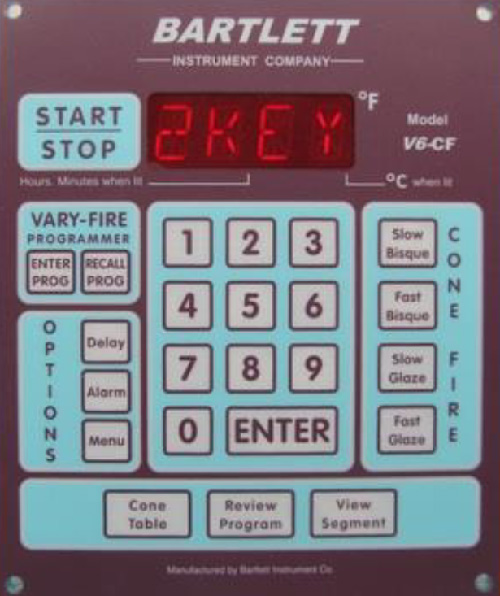
Protect your kiln from accidental firings by enabling the two-key start feature on your Bartlett V6CF or RTC1000 controller.

Kiln
Greenhouse
Bartlett
Tips & Tricks
By
Bartlett Instrument Team
on
July 22, 2015
No items found.

What is the Two-Key Start Feature?

The two-key start feature on Bartlett controllers is a simple yet effective way to prevent unintentional firings. By requiring users to press both the Start and Enter buttons to begin a firing, this feature ensures that your kiln won’t accidentally start if the Start button is bumped or pressed unintentionally. It’s a great safeguard for busy studios, classrooms, or any environment where accidental firings could occur.
No items found.

How to Activate the Two-Key Start Feature

Enabling the two-key start feature on your Bartlett V6CF or RTC1000 controller is quick and easy. Follow these steps:

Access the Menu

  • Press the Menu button, then enter 4, 4, 3 on the keypad.
  • The display will show NOTC.

Locate the Two-Key Start Option

  • Press the Menu button repeatedly until 2KEY appears on the display.

Turn the Feature On

  • Press Enter. The display will show either On or Off.
  • Press the 1 button to toggle between the two options.
  • Once On is displayed, press Enter to activate the two-key start feature.

That’s it! Your kiln is now set to require both the Start and Enter buttons to be pressed before firing begins.

Why Use the Two-Key Start Feature?

Accidental firings can lead to wasted energy, damaged projects, and even safety hazards. The two-key start feature provides peace of mind by adding an extra layer of security to your kiln operation. This is especially useful in environments where multiple people may be working near the kiln, such as classrooms or shared studios.

Additional Safety Tips

While the two-key start feature is a great way to prevent accidental firings, there are other steps you can take to ensure safe kiln operation.

  • Keep the controller clean: Regularly inspect the keypad for dirt or debris that could cause buttons to stick or malfunction.
  • Educate users: Make sure everyone who uses the kiln understands how to operate the controller properly and safely.
  • Monitor firings: Use tools like the Bartlett Data Logger or KilnAid app to keep track of your kiln’s performance and firing progress.
No items found.
No items found.
No items found.
No items found.

We pride ourselves in quality products & service.

More Greenhouse News

More Kiln News

View All