Kiln Firing Basics

Fast Re-Fire on the Model 3K

Save time and simplify your firing process by using the Bartlett 3-Key controller to repeat your last program with just a few button presses.

Kiln
Greenhouse
Bartlett
Tips & Tricks
By
Bartlett Instrument Team
on
October 15, 2015
No items found.

Refiring Made Simple

The Bartlett 3-Key controller includes a convenient feature that allows you to repeat the last firing program you used without having to re-enter all the settings. This is especially useful for kiln users who frequently run the same program, such as for bisque or glaze firings. With just a few simple steps, you can get your kiln up and running again in no time.
No items found.

How to Refire Your Last Program

Refiring your last program is straightforward and can be done in seconds:

  1. Check the Display:
    Ensure your kiln controller is showing STOP or IdLE. This means the kiln is ready for a new firing.
  2. Review the Last Program:
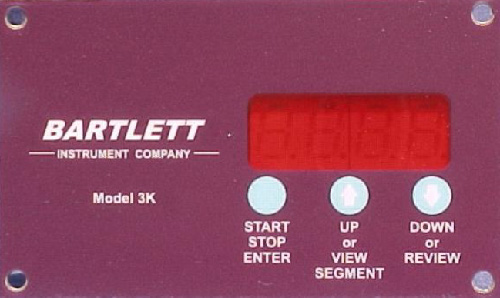
    Press the down arrow key. The controller will display the settings of the last program you used and show rEdI on the screen.
  3. Start the Firing:
    Press the START button to begin firing the program.
  4. Skip the Review (Optional):
    If you’re confident the last program hasn’t been changed, press the down arrow key twice to skip the review. The controller will go directly to rEdI, and you can press START to begin firing.

Why This Feature is Useful

This functionality is perfect for kiln users who need to run the same program multiple times. It eliminates the need to manually reprogram the controller, saving time and reducing the chance of errors. Whether you’re firing multiple batches of the same project or simply want to streamline your workflow, this feature makes the process much easier.

No items found.
No items found.
No items found.
No items found.

We pride ourselves in quality products & service.

More Greenhouse News

More Kiln News

View All