Kiln Firing Basics

Programming a Hold for More Even Heatwork

A programmed hold at peak temperature can help ensure the entire load—especially pieces in the center—receives consistent heatwork for a more even, reliable firing.

Kiln
Greenhouse
Bartlett
Tips & Tricks
By
Bartlett Instrument Team
on
September 10, 2017
No items found.

Why Use a Hold?

Without a hold, pieces near the center of the kiln may not reach maturity at the same rate as those near the outer edges. Adding a short hold, typically 10–20 minutes, allows heat to fully penetrate the load.

Important: Holds are always entered as hh:mm, so a 20-minute hold is programmed as 00:20. If longer holds are needed, research the material first—excessive hold times can damage certain types of ware.
No items found.

How to Program a Hold (RTC1000, V6CF, & 3-Key)

Ramp Hold / Vary Fire Programs

  1. Begin a Ramp Hold or Vary Fire program
  2. Select the user and number of segments
  3. Step through each segment:
    • Enter the Ramp Rate (e.g., RA 1) → press Enter
    • Enter the Temperature (e.g., °F 1) → press Enter
    • Enter the Hold Time (HLd1) → press Enter
  4. Repeat for all segments where a hold is needed

Programming a Hold in ConeFire Mode (V6CF & 3-Key)

  1. Begin a ConeFire program
  2. Select the desired Cone
  3. Enter the Hold Time
  4. The controller will automatically hold at that cone’s top temperature

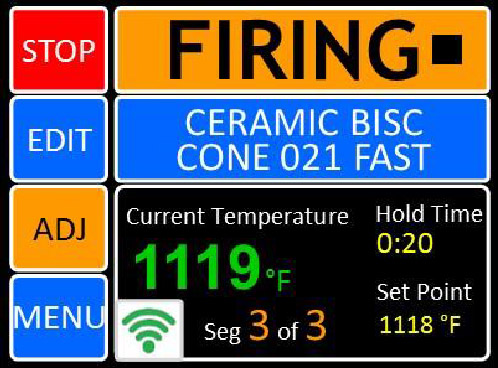
Programming a Hold on the Genesis

  1. Load your program
  2. From the Idle screen, press EDIT
  3. Tap the hold time you want to change
  4. Enter the new value and press Save
No items found.
No items found.
No items found.
No items found.

We pride ourselves in quality products & service.

More Greenhouse News

More Kiln News

View All